• On TechRepublic: Windows 7: Slower to boot than Vista?
March 31, 2009 6:00 AM PDT

My painfully poky week with IE 8

by Stephen Shankland

In the interest of broadening my horizons, I promised Microsoft I'd give Internet Explorer 8 a fair shake by trying the browser as my default for a week.

And, boy, am I glad that week is over.

Microsoft's browser rules the roost with about two-thirds of the market, according to Net Applications, which collects a broad set of data on which browsers people use. There's nothing like being built into the dominant operating system for winning a popularity contest. Microsoft takes advantage of that position by building instrumentation into IE that illuminates what a typical Web user is doing.

There's typical, and then there's me. As somebody who spends dozens of hours a week in a Web browser, I'm sorry to say IE 8 is not for me. Although my Web-heavy lifestyle isn't average, I believe the challenges I face on the Web foreshadow what the rest of the world will experience as the Internet inexorably encompasses ever more of our work and personal lives. I prefer browsers that aim toward where the puck is heading, as the tired but useful cliche goes.

IE 8 (download link) catches up to where the puck is today. It's definitely a big improvement over its predecessors, with some commendable features including default support for Web standards. And I do hope people upgrade.

It's just that in my personal experience, IE 8 is not in the same league as my default browsers, Google's Chrome or Mozilla's Firefox.
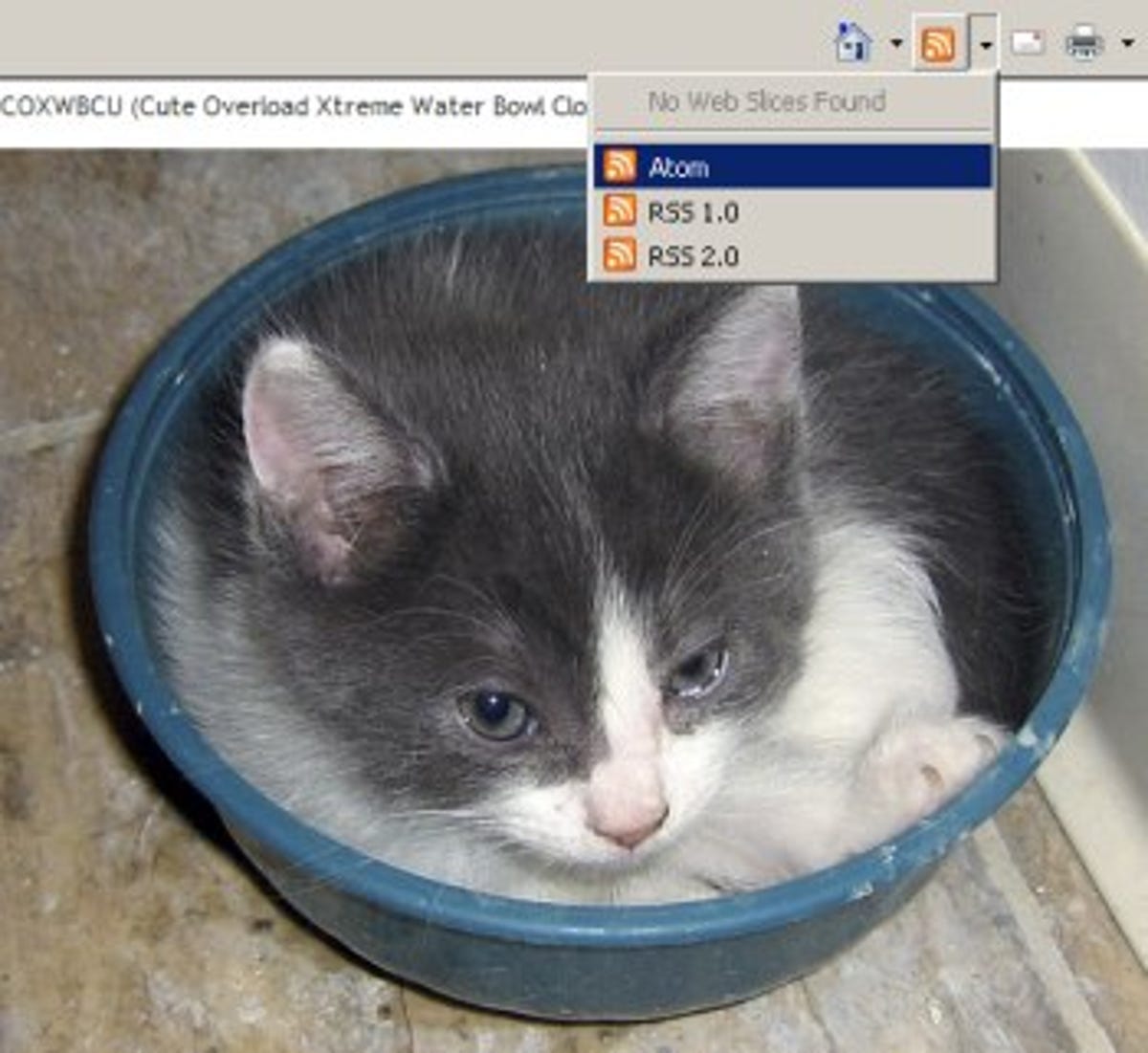
IE 8 can find RSS and Atom feeds for Web sites you can subscribe to, but only lets you use the browser, not Web sites, to view them.

IE 8 can find RSS and Atom feeds for Web sites you can subscribe to, but only lets you use the browser, not Web sites, to view them.

(Credit: Screenshot by Stephen Shankland/CNET News)

There are competitive points from these rivals that one might have thought would weigh in to my antipathy for IE 8. Google makes a big fuss about Chrome's high-performance JavaScript engine, which lets it run Web-based applications with greater sophistication and alacrity. Firefox fans adore the wealth of extensions that can tailor the browser to innumerable specific needs without cluttering the interface for those who don't want such features. Microsoft counters with a study that shows its page-loading speed generally beats out rivals.

Slooooooow
In reality, it was something more mundane that gave me a Pavlovian feeling of dread when I needed to use the browser: its interface is slow.

When it was time for basic interactions such as launching new tabs, switching tabs, closing tabs, commanding IE to open pages, and scrolling through pages, I found myself all too often waiting for the browser to respond to my mouse and keyboard. I did miss some Firefox extensions, even though I'm not a big user of them personally, and I did find Web applications like Gmail and Google Docs a bit slower. But those two gripes paled in comparison to performance.

Here's a sample diary entry from Tuesday, March 24: "31. Accidentally used Firefox for some browsing. What a relief!" I hadn't realized until that moment that I'd been inwardly cringing at IE 8 use.

The sluggishness problem got worse as my Lenovo dual-core laptop's 3GB memory was taxed by running the 10 or 12 programs I need to do my job. Most days, I shut down my Windows XP work machine once a day without thinking much about it. But during IE 8 week, I found myself craving a fresh start by mid-afternoon. IE 8 didn't bear the load as gracefully as rivals, especially as the tabs piled up.

Let me give some credit to Microsoft on the performance front, though. On my home machine, a Windows Vista 64-bit quad-core model with 6GB of memory, IE 8 was much more competitive with Chrome and Firefox, especially when compared with IE 7.

I liked the search box abilities built into IE 8.

I liked the flexible search box abilities built into IE 8.

(Credit: Screenshot by Stephen Shankland/CNET News)

What I liked
There were a handful of features I liked about IE 8 besides the speed boost over IE 7. Chief among these features: accelerators, especially the one that would let me quickly show an address on a Windows Live map. It's not a competitive advantage that will lift IE above its competitors, but for me it was truly useful and time-saving, and already I miss it.

Web slices left me unmoved, perhaps because I didn't spend enough time signing up for feeds from publishers I cared about, but also because I didn't like losing the screen real estate. But I could see some folks enjoying it--the kind who aren't yet inundated with hundreds of RSS feeds.

I also think the security features have merit. Although I didn't encounter any malware or phishing warnings myself, I suspect the Net will be a safer place as people gradually upgrade to IE 8--or at least that the malware perpetrators will have to work harder. We all stand to gain if the number of spam-spewing, compromised computers decreases.

Another IE 8 improvement is tab isolation, which can keep the browser functioning even if one tab crashes. On three occasions over the week the browser shut down a tab that was misbehaving in some way; in one of those cases, the whole browser came down shortly after. Overall, though, I was disappointed with stability: in a week of IE 8 use, I had about as many browser crashes as with the raw developer preview versions of Chrome. The Firefox betas have crashed almost not at all for months.

Although I'm one of the rubes who likes Chrome's unified search and address bar, I did find IE 8's search options handy. You can get some preliminary searching done without running the whole thing, sampling the various search engines.

IE 8's colored tabs left me unmoved.

IE 8's color-coded tabs left me unmoved.

(Credit: Screenshot by Stephen Shankland/CNET News)

Niggling nitpicks
Aside from the performance problem, there were other stumbling blocks in IE 8. The worst tripped me up about 10 or 20 times a day.

I copy and paste URLs from the address bar incessantly, and Chrome, Firefox, and Safari let me do so quickly as follows: Ctrl-L, Ctrl-C. It's programmed into my muscle memory. But IE sends me to an "open" dialog box with Ctrl-L, rather than highlighting what's in the address bar. So to copy an URL, I have to use the mouse.

The dialog box approach might be clearer to average users, but it was a hindrance to somebody who's constantly shifting Web addresses from one program to another. And if Microsoft is interested in clear explanations, why is the right-click menu to copy a Web address labeled "copy shortcut"? (Update 7:15 a.m. PDT: Reader Scott Strzinek points out that you can use F6 to highlight the address bar text. I'd still prefer Ctrl-L, but it beats using the mouse.)

Another gripe: on many pages, including Gmail, Yahoo Mail, and Google Reader, clicking a link opens the page in a fresh tab in my preferred browsers. In IE, it would open a new window, making a mess of my already bursting-at-the-seams attempt to manage browser sprawl. The solution: get used to middle-clicking to keep the new page in an associated tab.
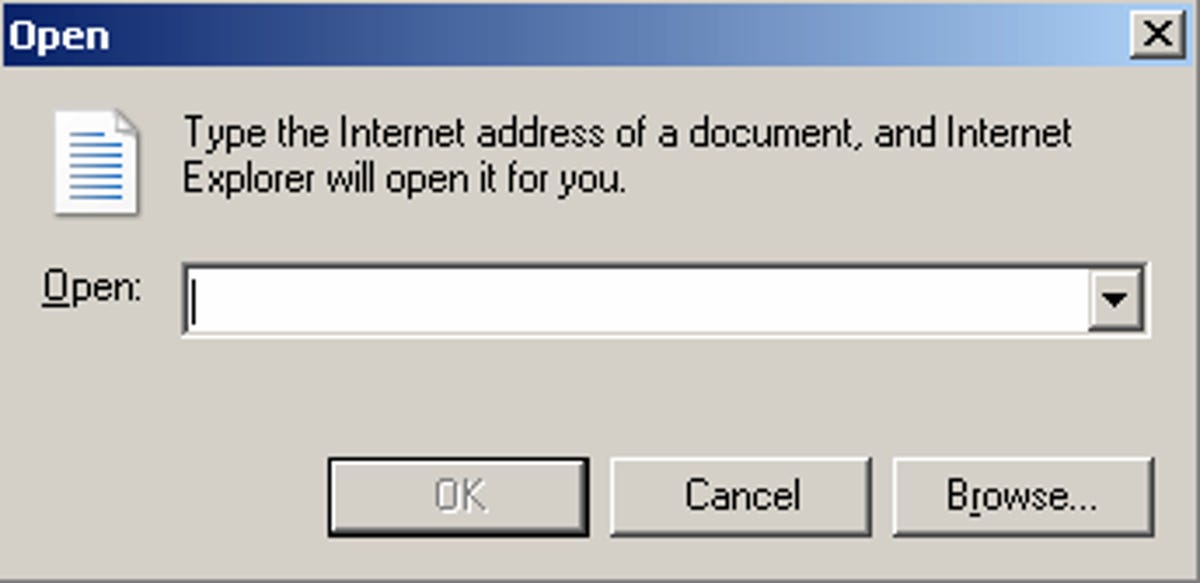
The dialog box to open a Web page, while seemingly innocuous, was the bane of my IE existence.

The dialog box to open a Web page, while seemingly innocuous, was the bane of my IE existence.

(Credit: Screenshot by Stephen Shankland/CNET News)

The third biggest nit for me was tab navigation. I like where the new tabs appear--to the right of the tab from which they are spawned rather than to the far right of the list--but I had a hard time determining which tab is the active one.

It turns out the active tab is a smidgen taller than the others, but it's hard to detect. Unlike Chrome in particular, where the tab flows downward into the window, IE 8's tabs are graphically separated from the window they belong to.

The colored tabs that group related Web sites seem like a good idea in principle, but I found that they miscarried in practice for me. I found myself thinking the color was some sort of call to action. I grew inured after a few days, but I didn't ever find it useful.

Finally, no, IE, I do not want you to be my feed reader. I use Google Reader for various reasons, notably the ability to use any number of computers and two mobile phones at present.

Overall, my assessment depends on the point of comparison. I prefer Chrome and Firefox. Still, IE 8 is a big step forward from IE 7. And I, for one, encourage people to upgrade for the security alone.

Stephen Shankland writes about a wide range of technology and products, but has a particular focus on browsers and digital photography. He joined CNET News in 1998 and since then also has covered Google, Yahoo, servers, supercomputing, Linux and open-source software, and science. E-mail Stephen, or follow him on Twitter at http://www.twitter.com/stshank.
Recent posts from Webware
Popular iPhone movie app flops on BlackBerry
Opera Mobile 10 beta browser: First Look video
Google trying not to cross 'the creepy line'
Integrated retweet on its way to Twitter
Mozilla's e-mail group looks toward the cloud
Facebook: We're going after scammy ads, too
Alterna-browsers Firefox, Chrome get quick fixes
Offerpal Media mess gets stickier
Add a Comment (Log in or register) Showing 1 of 6 pages (186 Comments)
by sparrowhyperion March 31, 2009 6:36 AM PDT
I only use IE for eBay. And I only use it because eBay does not play nice with Firefox. I seriously hope they do something about that because after a year with FireFox, I have no plans of ever going back to EI of any version, for my default browser. And it would be great if I could get FireFox to work properly on eBay. I am glad I will be able to opt out of installing IE once Windows 7 comes out, because as far as I am concerned, it's a slow, insecure, buggy, waste of disk space.
Reply to this comment
by Super2online March 31, 2009 11:45 AM PDT
So many people are having a problem with IE being slow, yet for many of those users the problem turns out to be their system rather than the app. Read this article and take 30 seconds to implement the solution and be amazed at how fast IE is afterwards. I was!

Is IE8 really fat and slow?
Ed Bott
http://blogs.zdnet.com/Bott/?p=754
by t8 March 31, 2009 2:31 PM PDT
It is slow compared with other browsers.
Also, IE8 crashes a lot.
by Inconnux March 31, 2009 2:41 PM PDT
If you have problems, switch to another browser and see if that helps. If it does help, then the problem IS IE
by akayanni March 31, 2009 8:08 PM PDT
Yea I use FF3 with ebay all the time and have zero issues. IE has a single purpose here. Doing condition comments to cope with it's crappiness for the sake of others. Chrome fails to impress and Safari makes for good looking screen grabs. IE8 will replace IE7 for some but it won't convert anyone who has left the sinking ship of IE. We ain't never coming back MS.

Yani
by Eustov March 31, 2009 9:40 PM PDT
Try out Maxthon (though it uses the IE core), in terms of usability its at least a generation or two ahead of most web-browsers on the market.. Super drag and drop, unified search, url aliases, gestures, content filtering, multiple tabs are just a few features that were introduced in Maxthon years ahead of other browsers.. i would probably even say its the most customisable browser on the market, try it.. for me surfying with any other browser just feels like driving with the hand brake on..
by pentest April 1, 2009 7:54 AM PDT
maxthon isn't a browser. It is a turd polisher.
by mikeburek April 2, 2009 9:53 PM PDT
Maxthon is awesome. It was great when my employer at-the-time, locked the network so that only IE could access the internet. Because only IE was deemed "secure" and rogue programs (specifically FF) had too many "security holes." With the Maxthon tabs and other features, I could always get my work done so much faster than other co-workers.
by ducttape36 May 26, 2009 12:29 PM PDT
the zdnet blog was great. everyone who uses ie should do the trick he posted:

type the following in the command prompt:
regsvr32 actxprxy.dll

That re-registers the ActiveX Interface Marshaling Library, an obscure DLL that most people (even Microsoft experts) had never heard about. (Update: 27-Mar: Note that if you try this using Windows Vista, you must do this from an elevated Command Prompt window; type cmd in the Start menu Search box, right-click the Cmd.exe shortcut, and then choose Run As Administrator. For detailed instructions with screen shots, see this post.) After restarting her computer, she tried using IE8 again. The results were stunning:...

so much faster!
by ghaff March 31, 2009 6:36 AM PDT
The thing I found especially annoying is admittedly something Microsoft would say is a feature--namely my apparent inability to tell it a site is permanently OK even though there's a security certificate mismatch. We have self-signed certs for a couple of internal sites and IE ******* about them every time I tried to use. You could argue this is correct design but it was annoying in my case.
Reply to this comment
by webdev511 March 31, 2009 7:26 AM PDT
I have some sites with self signed certs that have the same issue. Amazingly enough, using IE's Help guided me how to fix the problem. Yes RTFM actually solved a problem. Go figure.
by rapier1 March 31, 2009 10:49 AM PDT
You just have to import them into the certificate store. That takes care of the problem the 'right' way.
by ghaff March 31, 2009 12:52 PM PDT
@rapier1 I thought that I did that. But I must have done something wrong--or there may have been some other certificate issue.
by merlefisher March 31, 2009 5:48 PM PDT
I use ebay quite a bit on my mac using firefox as my default browser. What parts of the site are not rendering properly for you?
by TotallyMadeUpName March 31, 2009 9:50 PM PDT
Merlefisher,
For me, Ebay pages often take forever to display in Firefox. Snappy rendering in imperative when you are trying to win a competative bid.

It's actually nice to hear that others are also having problems with Firefox and Ebay.
by complexprocess March 31, 2009 6:49 AM PDT
> I believe the challenges I face on the Web foreshadow what the rest of the world will experience
> as the Internet inexorably encompasses ever more of our work and personal lives. I prefer browsers
> that aim toward where the puck is heading, as the tired but useful cliche goes.

Sounds like you're up to some pretty important stuff. *scrolls down about 6 lines* Oh, I see. Subscribing to Cute Overload. Watch out world, this man is on a mission and you'd better get out of his way. :-P
Reply to this comment
by Shankland March 31, 2009 8:27 AM PDT
Ha! I couldn't find a way to show keystrokes failing to select labels in Gmail, so I figured the lame RSS support would suffice.

Icanhascheezburger.com gets all the love these days, and I have a soft spot in my heart for Cute Overload.
by j_ten_man March 31, 2009 6:52 AM PDT
+1 for Chrome
-1 for IE8

I can't even open up IE8 because it is sooooo slow compared to Chrome.
Reply to this comment
by Lerianis3 March 31, 2009 11:47 AM PDT
It's not slow on the one computer I have (a gaming class notebook) but on the other that is running Windows 7 Build 7057..... UGH! Slow as heck, though I traced that after disabling ALL addons back to the Java addon, which is apparently incompatible with Windows 7 or IE8 in Windows 7, since I had no problems with it in IE8 on Vista on either of my other two computers.
by mjconver March 31, 2009 7:01 AM PDT
I just uninstalled it, like you said it was slower than before. And for me, there were no new worthwhile features, extra nags that were almost Vista-like, and previously fine websites that I used every day got broken.
Reply to this comment
by Lerianis3 March 31, 2009 11:48 AM PDT
That is a concern for me as well. ZDNet and CNet were having problems posting my replies to things....... I finallly had to re-login at the first page, and clear the browser memory.... that fixed my problem, as did putting these two pages in "compatibility mode".... which I didn't have to do in IE8 RC!
by listenup2 April 1, 2009 12:37 PM PDT
How can I uninstall?
by HamInTeeTown March 31, 2009 7:04 AM PDT
Chrome is the new standard, period.
Reply to this comment
by mjconver March 31, 2009 7:14 AM PDT
No, Chrome is not the new standard, it doesn't have AdBlock Plus, and likely never will.
by Pluberus March 31, 2009 7:56 AM PDT
Firefox is the standard...
by Shankland March 31, 2009 8:30 AM PDT
@mjconver: Chrome extensions are getting closer--they exist in rudimentary form at present but are maturing--AdBlock Plus is one of the use cases that Google mentioned by name as a reason to add extensions. So I wouldn't be too hasty about that assumption.
by celticbrewer March 31, 2009 9:48 AM PDT
Yeah, I'm sure Google will allow people to block thir cash cow. Maybe AdBlock will block all competitor's ad networks.

As for Chrome... can't stand it. Or Opera. Firefox has what I want and works how I work. I did try IE8 and had zero technical problems, but I just didn't like the user interface. It was definitely faster than firefox, though.
by Ilgaz March 31, 2009 2:49 PM PDT
Chrome is Google managers "we can do it too" toy with "threaten Mozilla" feature. It is nothing else. They can't even scale the code to other operating systems than Windows and you know the funny thing? That "state of art" javascript engine ONLY runs on x86.
Even MS wouldn't do such a mistake, I also bet they even manage Mac IE secretly while they declared EOL long time ago.
by ddcool1124 March 31, 2009 3:24 PM PDT
All desktop computers only use x86.

Chrome is awesome because it dynamically generates binary machine code for javascript rather than interpreting it.
by Ilgaz March 31, 2009 3:51 PM PDT
all mobile devices , especially iPhone uses ARM, RISC architecture. Now what?
by exactlyy March 31, 2009 6:19 PM PDT
what standard are you talking about ? having feeds 6 months after it was officially released? or not having master password to protect your saved passwords ? or maybe being naked is the ultimate standard for you :P
cmon Firefox is undefeatable,and opera is second ,it starts as fast as chrome and its feature-packed.
by firefoxluva95 April 8, 2009 2:39 PM PDT
Gecko rendering engine is the standard, not Webkit.
by pablouk1 March 31, 2009 7:08 AM PDT
Its ok but not worth upgrading from 7-8 ...yet.
Give it about 3 patches and i think it will be worth it.
Reply to this comment
by Lerianis3 March 31, 2009 5:35 PM PDT
Patches aren't going to change much, and aren't going to change the speed in the slightest. If you are looking for that to happen.... forget it.
by DKrudop March 31, 2009 7:09 AM PDT
Perhaps you should try Safari as well.
Reply to this comment
by webdev511 March 31, 2009 7:27 AM PDT
Safari looks and acts like poo on windows. It's fine on OSX, but not so much on windows.
by Shankland March 31, 2009 8:32 AM PDT
I've been thinking about it since the release of the Safari 4 beta. I use it a few times a week and generally like it, but it's not revolutionary to me, and there are some UI issues I don't like.
by seven7dust March 31, 2009 9:43 AM PDT
safari 4 on windows sux
I used to use safari 3 a few months back but have now replaced it with chrome
and as usual I use firefox 3 as well
I hope there comes a day when we can have a browser with the customisability of firefox and the speed efficiency and UI of chrome
by Seaspray0 March 31, 2009 11:28 AM PDT
Safari is malware in my book. It attempts to load two other programs (quicktime, itunes) that have nothing to do with browsing.
by pentest April 1, 2009 7:58 AM PDT
Than by that definition Windows is malware. It forces you to install, IE, WMP, and messenger, none of which have anything to do with an operating system.
by softwarewillalwaysbebuggy April 2, 2009 12:06 PM PDT
Then by your definition, isn't OSX also malware. It forces you with Safari, Quicktime, iChat, etc., none of which has anything to do with an operating system.
by monkeyfun14 April 8, 2009 6:58 AM PDT
@software

Yes but no other software nags me to install other programs when I try to update it.
by PColigist March 31, 2009 7:10 AM PDT
I can agree with some of your comments reference IE8 I found it very slow to start some 10-12seconds some times. Once started it worked well it only crashed once closing that tab. I still think it is buggy and there is still fine tuning to do. I certainly agree with you about Firefox I think it is an excellent browser though it does have some limitations.As for Chrome this is a very basic browser which is liked by some users my opinion is its a bit infantile for my use as a web master. One thing to remember about using laptops as a main machine you must appreciate that whatever the processor is called it is still a tiny mobile processor and as such has limitations. Good article enjoyed the read.
Reply to this comment
by Lerianis3 March 31, 2009 5:37 PM PDT
Most of those 10-12 second start times are happening because a control called actxprxy.dll is getting unregistered or not properly registered. Run regsvr32 actxprxy.dll and that SHOULD fix the problem.
If it doesn't, and you have Java installed on your machine....... disable the add-on that is installed for that in IE8. That solved my problem with slow speeds and I have informed Java about this problem. Supposedly, according to the reply I got, they are aware of this issue on some computers and are looking for a fix.
by sciontcya March 31, 2009 9:18 PM PDT
NIce acid3 score IE!
by pentest April 1, 2009 7:59 AM PDT
So lerianis, you have to go to the command line to fix it? LOL

You have informed Java? Too bad their is no entity called Java.
by a_flores March 31, 2009 7:11 AM PDT
I am disappointed with IE8. One of its tab always hang almost every hour. It is much slower compared to Chrome, Safari 4 Beta, and Firefox. It still uses old style to open an html file from computer (file, open, browse, ok). I abandon and ignore it and go back to Chrome, Safari4 beta, Firefox and Opera.
Reply to this comment
by massfat March 31, 2009 6:39 PM PDT
There are some known compatibility issues with certain IE8 addons and windows 7 addons. These problems are causing huge lag times for IE8. IE8 by itself actually runs quite fast.
by kelmon March 31, 2009 7:12 AM PDT
Overall, I'm reasonable happy with IE as a browser that I MUST use for work (at home it's Safari on a Mac - go figure). My only real issue over the past week or so is that IE8 doesn't play nicely with all of our web applications. For example, for some odd reason it seems to be unable to download attached documents from our PeopleSoft 8.9 instance; both IE7 and Firefox seem quite happy to do this. I'm hoping that these quirks are sorted out. With IE8 a new Tab will be opened and then immediately closes without providing the option to download the file.

With respect to the article, I am right with you on the Control+L issue. Why IE still persists with this Open URL dialog rather than moving focus to the URL field of the browser like every other browser is quite beyond me. It's not a problem but simply an unnecessary irritant.
Reply to this comment
by Seaspray0 March 31, 2009 11:33 AM PDT
@kelmon. I suspect that the application uses an active x control. Try this to correct the issue: add the website of your web applications to the intranet or trusted zone. Adjust the security on that zone to allow the features that your website needs. It will not interfere with the security level used for the rest of the internet.
by BogusBasin March 31, 2009 7:20 AM PDT
I wish everyone would refuse to embrace products that ignore open standards. Open standards are the only way we maintain freedom of choice. If you could open all sites with all browsers, you would be free to choose which one you prefer. As it is now, you can not fully get rid of IE because there are still sites that are written to take advantage of non-standard proprietary IE. MS is to blame as well as the Site developers. Things are getting better though. Amen
Reply to this comment
by celticbrewer March 31, 2009 9:53 AM PDT
Yeah, and we should boycott flash sites because it requires a proprietary plug-in.

/sarcasm
by Shankland March 31, 2009 10:28 AM PDT
Standards are important, but are you really going to blame a Web dev for supporting the browser with majority market share even if it's not standards-compliant?

Also, IE 8 moves Microsoft a huge step toward standards compliance. And Microsoft is working on establishing better CSS compliance, too, by submitting test cases to the W3C:

http://blogs.msdn.com/ie/archive/2009/03/20/more-web-standards-tests-submitted-to-the-w3c.aspx
by Lerianis3 March 31, 2009 5:38 PM PDT
Ah, but IE doesn't HAVE a majority marketshare anymore. That is squarely in Firefox's corner, and since it IS standards compatible, sites should start only supporting standards compatible browsers.
by pentest April 1, 2009 8:01 AM PDT
"Standards are important, but are you really going to blame a Web dev for supporting the browser with majority market share even if it's not standards-compliant?"

Yes, because their is no reason to explicitly support any browser. In fact, it is more work, time, and money to support a specific browser.
by monkeyfun14 April 8, 2009 7:02 AM PDT
@Lerianis

Point out a article stating firefox has majority marketshare.
by ppgreat March 31, 2009 7:34 AM PDT
I know that most companies just stay with IE (don't get me started on that topic), even though the IT folks generally play with Firefox or Chrome, but I've really been surprised with the performance of the Safari 4 beta on OS X and Windows. It's worth a look.
Reply to this comment
by mossad67 March 31, 2009 11:11 PM PDT
I don't know why, but Safari 4 beta just sucks terribly on my Macbook Pro, especially displaying Flash sites with external assets and a container movie, or xml driven. I hope they fix it because I really like some of the new features. By the way, I find it amusing that IE8 is trumpeting features that have been existent on Safari and Firefox for at least 2 years now. Good ol' MS - ahead of the curve as usual.
by monkeyfun14 April 8, 2009 7:03 AM PDT
@mossad

What features does Safari and Firefox have built in to the browser that IE is just now trumpeting?


And with FF addons you can't claim that they copied firefox if the feature is not built in..
by jriebe March 31, 2009 7:39 AM PDT
In regards to the following gripe: "Another gripe: on many pages, including Gmail, Yahoo Mail, and Google Reader, clicking a link opens the page in a fresh tab in my preferred browsers. In IE, it would open a new window, making a mess of my already bursting-at-the-seams attempt to manage browser sprawl. The solution: get used to middle-clicking to keep the new page in an associated tab."

Just update your tab browser settings for IE8 (like you can for IE7) to force new content to open in a new tab rather than a new browser window. Sheesh... It appears you have not done your homework.
Reply to this comment
by timber2005 March 31, 2009 2:37 PM PDT
Thanks... saved me making a new comment on that.
It's been a setting since IE7, and since you probably didn't have it set in IE7, it didn't move over to IE8.
The default was left at open in new window because of feedback on IE7. People weren't used to tabs (remember this was back in FF1.0 days!)
by ducttape36 March 31, 2009 7:41 AM PDT
I've been using firefox for a few years now, and i just recently switched over to IE to test it out. I agree its slow compared to firefox or any other browser, but i really love the accelerators. ANd i do love when a tab crashes the whole browser doesnt crash, and it often recovers within seconds without any input from me. Overall I find stability to be on par with firefox (firefox 3 has been crashing more and more for me, I dont know why...) but firefox is faster. Right now I'm evenly split between the two.
Reply to this comment
by keith.r.benedict March 31, 2009 7:44 AM PDT
IE 8's UI is definitely much slower than Chrome or Firefox. The biggest problem, however, is the fact that there's no built in spell checker.

I tried Safari 4 beta and generally like it until I discovered that, even with with only 4 tabs open, it chewed through 1GB RAM. As with most Apple software that runs on PC's, the Safari developer haven't figure out Windows memory management.
Reply to this comment
by seven7dust March 31, 2009 9:45 AM PDT
try safari 3 it was really great with ram usage
but chrome is the best when it comes to memory usage
by rapier1 March 31, 2009 10:12 AM PDT
Safari 3 on OS X is a big with memory. I don't reboot very often (you shouldn't need to reboot an OS) and I don't fully close applications unless absolutely necessary (again, you shouldn't need to close an idle application). After a couple days of usage Safari is usually hitting 2GB+ of vmem. This leads to a *lot* of swapping and really slows things down a lot. Of course, this problem seems to be across the board - no browser seems to be very good at cleaning its resident cache.
by 1363nd0f1337 March 31, 2009 8:03 AM PDT
Tried IE 8 and couldn't get it to launch without setting of the DEP for some reason and had to turn off the "protect from attack using buffer overflow" thing in the Internet Options to get it to load a webpage successfully and that's BS. Uninstalled and back to Firefox.
Reply to this comment
by lonestarState March 31, 2009 8:04 AM PDT
I did notice after testing Internet Explorer 6-8 that the browsers have a ridiculous bug with certain ajax functions... In the following test Internet Explorer fails to dynamically paint a given <div>. Test it yourself, it works with all browsers except IE... http://89.233.173.91/bug/
Reply to this comment
by bayden March 31, 2009 9:19 AM PDT
As you can see in IE8's script debugger, your problem has nothing to do with AJAX. The problem is what you try to do with the response.

Using %hhhhh is not a valid color format; you need to use %hhhhhh instead.
by Suboculis March 31, 2009 8:24 AM PDT
Your IE8 is slow because it's probably not registered properly.
Do this tweak and youll notice a difference.

http://www.edbott.com/weblog/?p=2443
Reply to this comment
by Lerianis3 March 31, 2009 5:40 PM PDT
Yeah, that sped up all the computers I installed IE8 on as well..... Microsoft needs to EXPLICITELY re-register that .dll when IE8 is installed or when IE8 is started for the first time.
by sroussey March 31, 2009 8:28 AM PDT
ALT-D = Location Bar in every browser. Not sure why Firefox added CNTL-L. Maybe to confuse people and make them use their own keyboard shortcut to get people to lock in with them. Worked on me.
Reply to this comment
by sillygoosen March 31, 2009 9:00 AM PDT
ya exactly. i just posted a rant about this too. writer lost some credibility with me for not bothering to look up what the shortcut was in IE. Kind of a bogus article if you aren't going to bother to look up how to do something in the browser your using. I was used to CTRL+L but it only took a day to get used to ALT+D.
by cnet_user_0 March 31, 2009 9:57 AM PDT
@sillygoosen

I agree with you completely when you say that the write lost credibility. I think his main aim was to flame IE8 'cause he wants other browsers to follow his favorite browsers, ignoring standards left and right.

I installed IE8 on my Lenovo Vista-based laptop with 2GB and it rocks! As long as it is faster than its predecessor, that's enough for me. I certainly don't care for Firefox and Chrome.

For me, I use IE8 'cause the OS is by Microsoft and it gives a sense of assurance that Microsoft will act if there is a problem with IE8 or its OS. I can't say the same for the makers of Firefox and Chrome.
by sillygoosen March 31, 2009 10:24 AM PDT
cnet_user_0: you hit the nail on the head. i can handle a split second longer loading speed for a web page for the advantages of IE8. IMO anyway.
by Shankland March 31, 2009 10:50 AM PDT
Dinging me for Alt-D (or F6) is fine, since I harped on it, but my main gripe was sluggishness.
by nyolsson March 31, 2009 11:10 PM PDT
cnet user --

"and it gives a sense of assurance that Microsoft will act if there is a problem with IE8 or its OS. I can't say the same for the makers of Firefox and Chrome."

dude, i'm not gonna fan boyishly bash what ya just said, i love ms, well windows inparticularly.... but sense of assurance?

google is constantly coming out with updates for chrome. i mean, its basically an alpha build browser, that is 99 times out of a 100, faster (safari's up there), more reliable, and simply put, easier than any other browser. Chrome's management platform for downloading could use some work but man,

Chrome has barely been around for 8 MONTHS-ish and smokes the what, 8th VERSION of IE....

.
by nyolsson March 31, 2009 11:33 PM PDT
im not saying chrome is perfect. but i mean come on. i remember using IE to open .jpgs and other pictures in v2.0.

like i said, chrome has been out since, what like early fall / late summer-ish 08, on the second beta build of its existence, and smokes IE.

dragging tabs out of the browser..... the find feature is awesome! you guys notice it adds a little color to the browser's scroll bar as to where the "found" word(s) are located... thats if ya dont want to hit enter to find the next listing. ha.
by pmchefalo April 4, 2009 3:40 AM PDT
Then there's the venerable Ctrl-C / Ctrl-V copy / paste combo that the genius Mr. Shankland doesn't know about as well. Poor article, the guy is a neophyte.
by steven3x April 7, 2009 10:00 PM PDT
Also, F4 will highlight the location bar in IE (or F6 in Mozilla Firefox and Google Chrome), so either that or Alt-D as mentioned both avoid the need to use to mouse.
Showing 1 of 6 pages (186 Comments)
advertisement

About Webware

Say No to boxed software! The future of applications is online delivery and access. Software is passé. Webware is the new way to get things done.

Add this feed to your online news reader

Webware topics

FAQ: Buying the right Windows 7 upgrade

Readers still have lots of questions on just which version of the software they need to buy in order to upgrade their PC. CNET News tries to offer some answers.

N.Y. lawsuit details Intel's 'largesse' toward Dell

Attorney General Andrew Cuomo's federal antitrust case filed Wednesday alleges a longstanding symbiotic relationship between Intel and Dell.

Inside CNET News

Scroll Left Scroll Right