How to use Gmail's 'Multiple Inboxes' for extra Gmail accounts
When I heard the news that Gmail was offering "Multiple Inboxes" as part of Labs, the first thing that popped into my head was "finally--now I can check multiple accounts from the same place!" Unfortunately, that's not how it works.
Instead, Google's solution is simply to place the results from various filters and search queries off to the side of your main in-box. By default it sets you up with messages you've starred, and unsent messages from your drafts folder. This is nice and all, but you can hop to those two places from links in the left-hand navigation.
What I really wanted to do was to get in-boxes from two of my other Gmail accounts into my main Gmail account, and I managed to get it to work with a little tweaking. Here's how to do it:
Step 1: Enable Multiple Inboxes in labs. It looks like this:
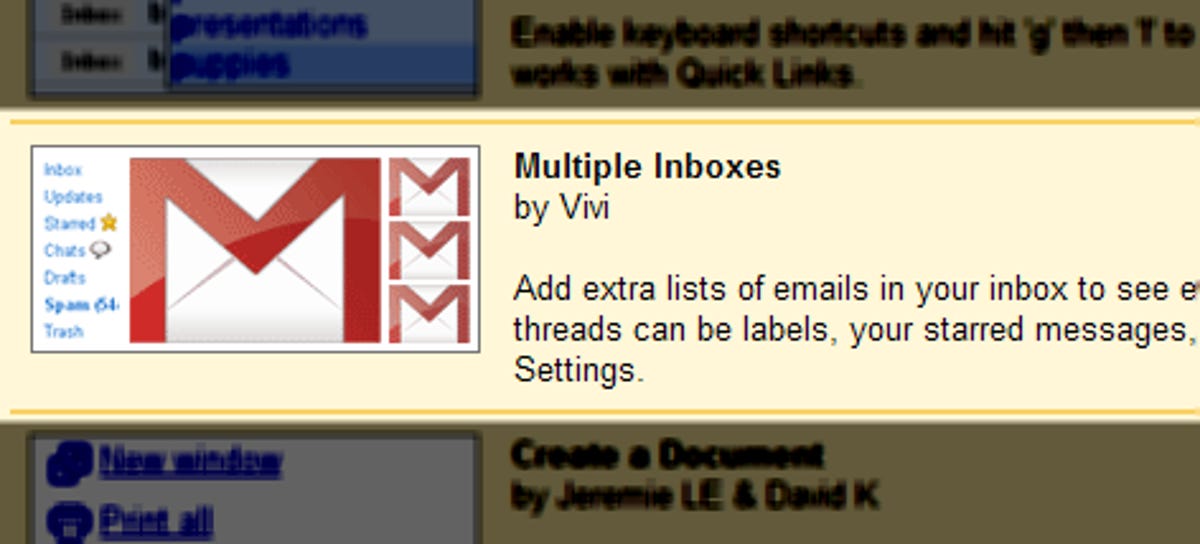
Step 2: Log in to the additional account you want to view from your primary Gmail account and open up the settings menu.
Step 3: Go into Forwarding and POP/IMAP and set forwarding to on, and have it send a copy to your primary Gmail address. Repeat this with any accounts you want to forward.

Step 4: Go back into the settings menu of your primary Gmail account and open the Multiple Inboxes menu. In each of the panes simply type in "to:" followed by the e-mail address of one of the forwarding accounts. So it should look like "to:YourAccount@gmail.com" minus the quotation marks of course.
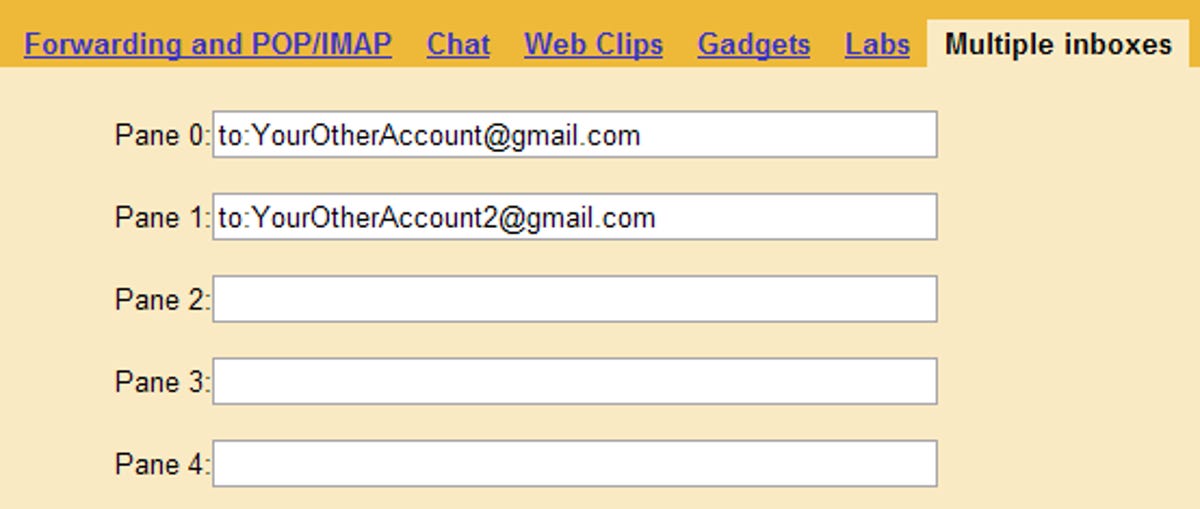
This system results in a few caveats that keep it from being a true "multiple in-box" experience. For one you'll need to actively set the right "send from" e-mail address when replying to a message from one of your other in-boxes. If you haven't done so already, this needs to be set up from the accounts menu in Gmail's settings.
Also it doesn't carry over any organizational goodness back to the source account, so if for example you star a forwarded message it's not going to have a star when you view it from the original account. The same thing goes for reading messages. So if you want to avoid an avalanche of unread mail back at the source accounts, one option is to set forwarded mail to be automatically archived. However, this might wreck havoc with your e-mail enjoyment on mobile devices and back at the source accounts. I recommend not turning it on, but if you're planning to only access your Gmail from the Web, and from your primary account this won't be an issue.
I'm hoping future versions of Multiple Inboxes will make this whole process a little easier to manage and simply let you plug in additional accounts. In the meantime this is a foolproof way to keep an eye on all three in the same place short of using a third-party Web mail aggregator like Fuser or Orgoo.
Update: As a few folks have pointed out there's another way to do this that avoids relying on forwarding and is smart enough to set the correct account when replying to a message. Here are the steps:
Step 1: Add your extra Gmail accounts to the "send e-mail as" option found in the accounts section in Gmail's settings. As mentioned before you'll need to confirm each account before you can start using it.
Step 2: Pull in the extra accounts you want to keep track of by adding them in the "get mail from other accounts" option in the accounts menu. When you're plugging in your account information be sure to select the "skip inbox" option as well as setting it to automatically label each piece of incoming mail. It should look like this:
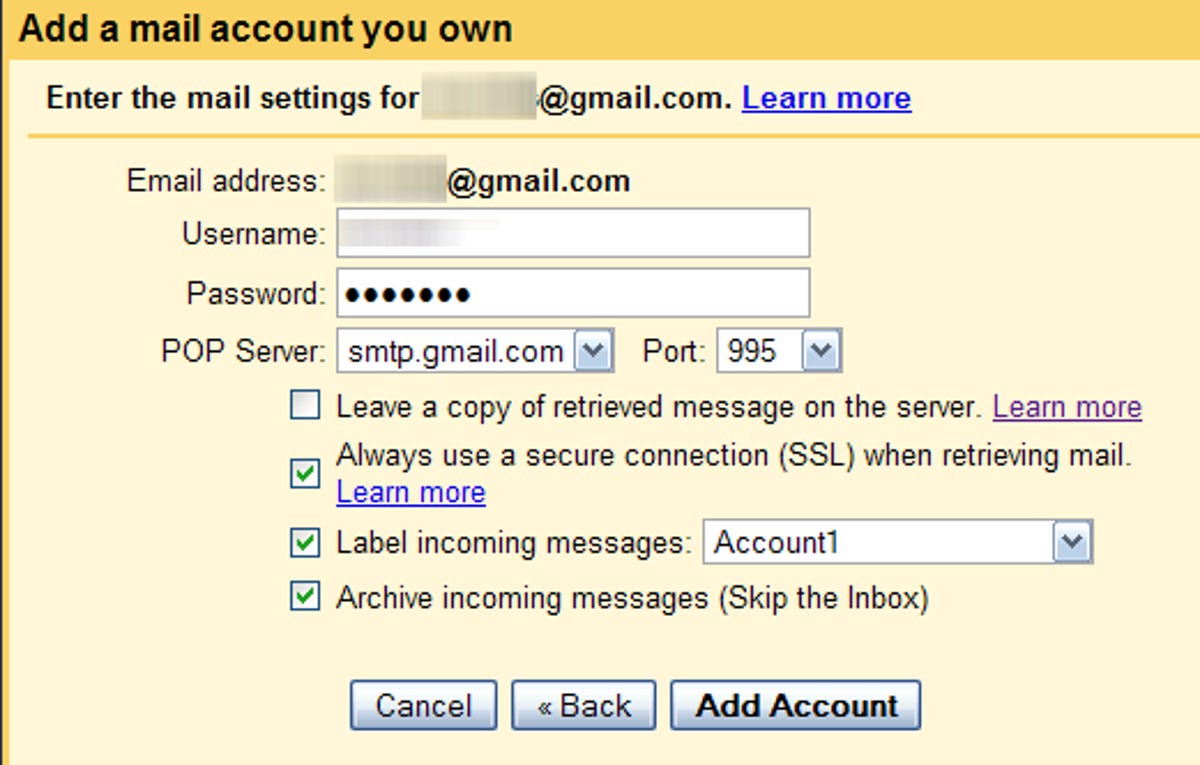
Step 3: Go into the Multiple Inboxes settings menu and plug in "label:" then whatever label you selected in step 2.
Like the first method, there are a few hang-ups with this one. For one, slurping in additional accounts takes awhile after you first set it up. More importantly, it takes space in your primary Gmail account. If you're doing this with several large and active accounts you're going to start running out of space more quickly, which for most I'm guessing won't be a problem. Nonetheless it's worth keeping in mind.
Josh Lowensohn writes for Webware.com, CNET's blog about Web applications and services. E-mail Josh, or follow him on Twitter at http://www.twitter.com/Josh. 


Here's the thing - this ain't new. I've had this for various groups and such I work with for at least 3 of the 4 years? Like 15 other Gmail accounts set up to forward in, auto-archive and then be able to Send As from my one primary account.
There's one thing - Gmail likes to screw up the outbounds. While now it'll forward properly and set it up so that when you hit reply it's the ID/account you had it sent to originally, I've had tons of them show up as the PRIMARY account holder, not the one I'm 'Sending As'.
So either way, it works but it's flaky AND it's 3+ years old. Not news nor new by any means.
Yes, Josh, you're a newbie. As "JaredEberle" wrote, the EASIER way is to POP your accounts from the single master account. Set the same filters in M.I. Settings and you're done. Gmail will "reply" based on the POPs automagically.
I can add multiple accounts & filtering in as another method.
What GMail really needs is the ability to access multiple gmail accounts (link, if you will, similar to the way Microsoft enables linked accounts) from the same inbox. It would be even better if functionality was present to move content from one gmail account/folder to a different gmail account/folder.
I have been experimenting with all sorts of scripts, applications, ideas, trying to work around gmail's
insistence on having only one account active at a time providing what is essentially the ability to switch back and forth from one gmail account to another as quickly and conveniently as the click of a mouse, none of which work quite all that well.
Cookie Swap a Firefox add on that provides several profiles you can switch back and forth to from at the click of a button located in the status bar that I found to be the best way to get around the
problem.
CookieSwap 0.5.1
'Cookie Swap' enables you to easily swap all your cookies so you can be logged in to multiple web e-mail accounts (like Gmail and Yahoo! mail) at the same time and quickly switch between them.
https://addons.mozilla.org/en-US/firefox/addon/3255
I have 3 gmail accounts, but only one is a true gmail account. The other 2 are Google Apps accounts under 2 separate custom domains, though they all use gmail, and I'm able to keep all 3 email accounts open at the same time without conflict.
I know this means getting domain names, but they're pretty cheap, and Google Apps is free for standard edition; And you get the benefit of having your own domain.
I think that 'multiple inboxes' doesn't really describe this feature well.
The only way to configure this is by entering search parameters, an search.
http://www.productivewise.com/7-great-gmail-multiple-inboxes/
In 'Account Settings' We have "Send mail as: (Use Gmail to send from your other email addresses)".
This is the same thing as using any computer based email program (Outlook, Outlook Express, Mac Mail etc..)
And I'm guessing doing it this way would fix the 'Send As" issue that someone mentioned.
Mail Forwarding should only ever be used for 2 reasons.
1) You got a new email address and want to keep the old one around but don't want to have to check it. So you just forward the email to the new addy.
2) For work purposes when you go on vacation and need to make sure your email is taken care of so you forward it to another co-worker until you get back.
is Gmail's biggest flaw in its mobile apps. I access 4 accounts from my Gmail but when using a mobile device I cannot switch addresses in "reply from:"
As for the haters: Whine whine whine. People, if you want to be heard, there are proper channels for submitting Gmail bugs. If you are here to talk, talk about something fascinating such as how "StarGate Universe" tech would develop Gmail lol. Gmail is fantastic. Personally I cannot wait for GoogleWave to become a full-out OS and do away with "Installing", "Downloading", and "patching" every single file of every machine I use throughout the day. It's ok to have your head in the clouds!
- by markymm September 1, 2009 11:59 AM PDT
- Just what I have been looking for. This is much better than having to deal with Outlook IMPAP or POP3 emails from gmail. Thanks Google.
- Reply to this comment
-
(17 Comments)