Hands on with Quicken Online
Intuit finally releases its online-only version of Quicken. Current power users of Quicken need not apply.


Intuit will release the Web version of Quicken on January 8. I just got a demo and spent some hands-on time with the beta of the app. The answers to the two big questions about the app are: Yes, Mint should worry. And No, Quicken Online is not going to cannibalize Quicken's software sales. (See previous news story: Intuit building Quicken Online.)
Easier to use, but does less

Like Mint, Quicken Online is targeted at people with "simpler financial needs" than typical Quicken desktop users, Quicken product manager Jim Del Favro told me. By that he means younger users who haven't yet seen their financial picture complicated with mortgages, investment portfolios, and employee stock option plans, financial instruments that Quicken Online does not support. In contrast, Quicken desktop lets you cook your own books a hundred different ways. (See reviews: Mint; Quicken 2008.)
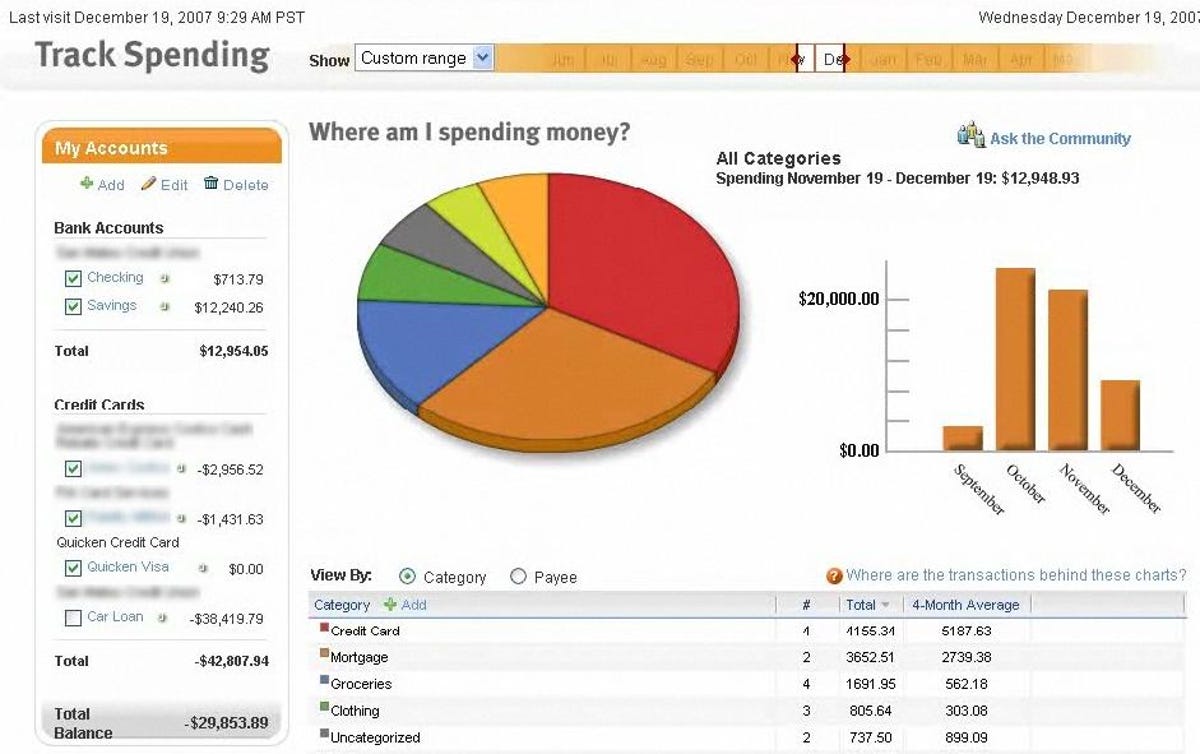
Like Mint, Quicken Online pings your financial institutions on your behalf and always shows you just what your banks and credit card holders know about your accounts. Quicken Online is based on a very strong cashflow management message. The home page is titled, "Am I living within my means?" It shows you, in three big boxes, the money you've earned in the last 30 days, what you've spent, and the difference. If the income is less than the outgo, the very stark third summary box tells you by how much, with the headline, "So, I overspent."
The product does not provide bill payment or presentment services. Rounding out the billing functionality is slated for future updates. However, Quicken Online does try to determine which of your expenses are bills, and it will remind you each month before it expects those bills to come due. It can even send reminders to your mobile phone.
For tax year 2008, Quicken Online will integrate with TurboTax Online (review), Del Favro told me. That's big.
In the beta I tried, setting up accounts was easier than it was in Mint's early days. The service knows about more than 5,000 banks and credit card issuers, and getting it to download your data is a simple matter of providing user IDs and passwords. As with Mint, you have to trust Intuit to keep your passwords safe. Intuit has the marketing advantage in this regard, since the company has been in the personal finance business for more than 20 years and has earned users' trust.
The product pings your financial institutions once a day and shows you all the charges and credits in your accounts. You can also add transactions yourself, and they will be automatically reconciled when they finally clear your bank. This makes it possible for multiple people (like a married couple) to use one Quicken Online account and still be up to date, even if the bank records are lagging. Del Favro also showed me an early beta of the iPhone version of Quicken Online, which could act like a modern check register for users--you just tap in your checks or credit card expenses when making them, and someone else using the account will see what your actual cash position is, not just what the bank knows about at that moment.

Support for the online product will be provided in a pop-up window that will meld both official Intuit responses as well as community discussions.
Quicken or Mint?
Both Quicken Online and Mint are simple to use, give you a very clear picture of your cashflow, and automatically keep your records up to date. Del Favro says Quicken has direct links to more financial institutions. I found that Quicken Online did a better job of categorizing transactions and that it was easier to correct its miscategorizations when it got them wrong (also, Quicken Online watches all its users' behavior to improve categorizing over time).
Mint's big advantage over Quicken Online is its price: It's free and advertiser-supported. The service watches what you spend money on so it can offer you deals from its sponsors that should save you money. Quicken Online costs $2.99 a month (after a 30-day free trial), but it doesn't have ads.
As a paying Quicken desktop software user (and critic), for online access to cashflow info I'd give the nod to Mint, which I use for quick check-ins with my bank accounts. But that's only because it's free. If Intuit would include a subscription to Quicken Online with Quicken desktop, I'd make the switch. Quicken desktop and Quicken Online, by the way, are completely separate products. There is no integration between them.
For monitoring cashflow, the products are largely comparable right now. Quicken Online's link to TurboTax Online, though, could make the service the one to beat.